Restaurant Management System
App-Rest
From QR ordering to floor plan and checkout: your restaurant's entire flow in one system.
App-Rest lets guests scan the QR code at their table and order without installing an app or creating an account, while your team runs the floor plan, checks, register, inventory and reservations from a single panel. Orders hit the kitchen board instantly, stock drops automatically from recipes, checks are split and settled, and the end-of-day report writes itself. Pickup and reservation pages run on the restaurant's own link, so you are no longer dependent on commission-based marketplaces.
App-Rest
Overview
In a restaurant, money rarely leaks from a single place. Orders are taken verbally, relayed to the kitchen incorrectly, and plates come back. During the rush a waiter cannot keep up and a table waits fifteen minutes just for a menu. Prices change, menus are reprinted, and an outdated card stays on the table anyway. At month end the stock count does not add up and nobody can say where it went. On top of that, commission-based delivery platforms take a slice of revenue and keep the customer data for themselves. None of these is a crisis on its own; together they quietly erode the margin.
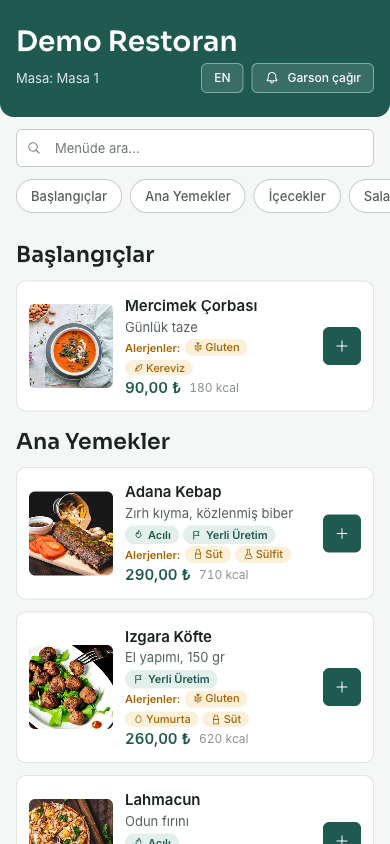
App-Rest brings that entire chain into one system. The guest scans the QR code at the table — no app download, no sign-up, no form. The menu opens on their own phone; they pick the item, choose doneness and extras, add a note and send it. The order lands on the kitchen board and in your staff's pocket the same second. Prices are always calculated on the server; no amount submitted by the guest is ever trusted. If the item has a recipe, ingredient stock is deducted automatically, and if stock runs short the order is rejected and the item shows as sold out on the menu.
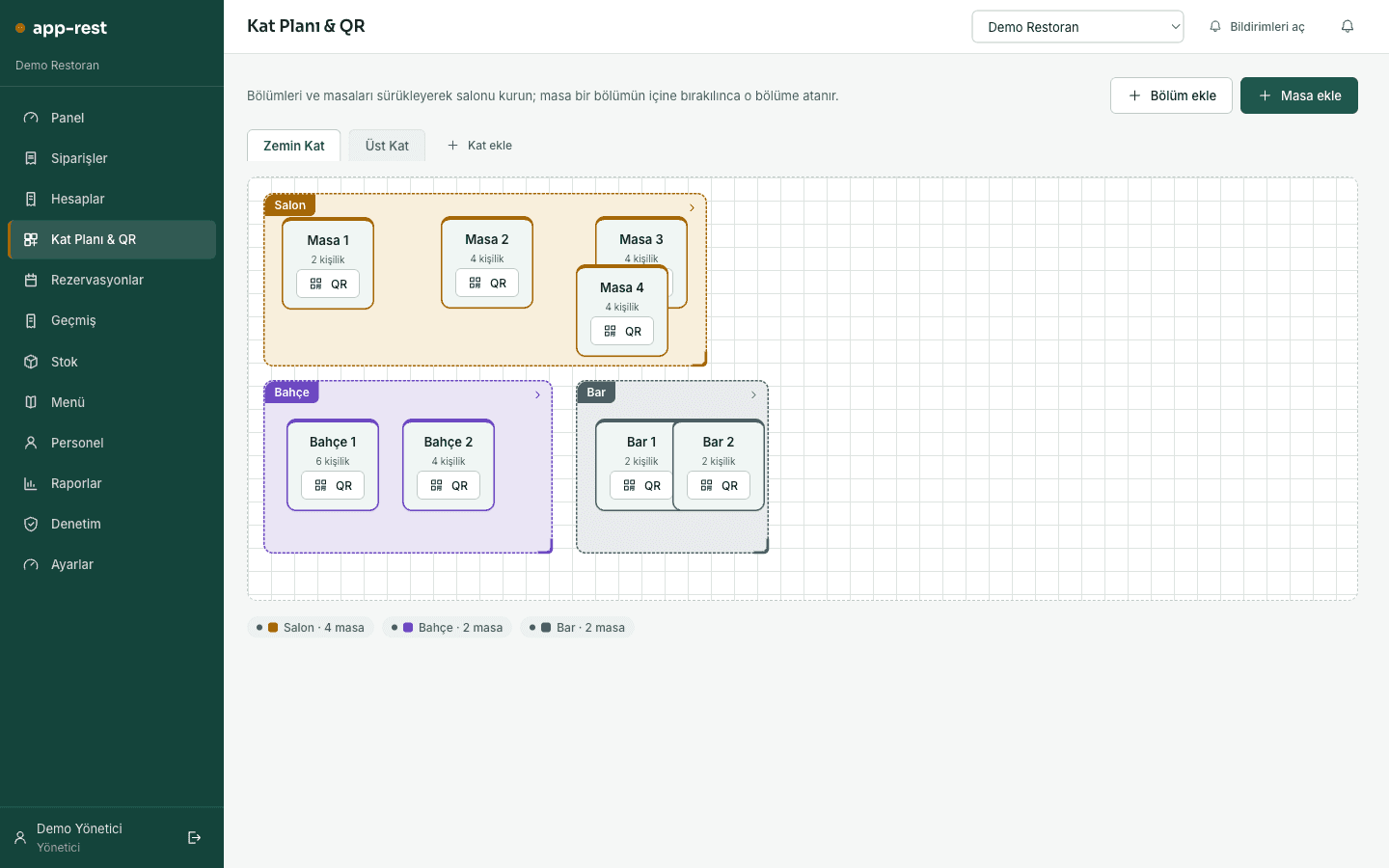
On the floor, the plan mirrors your real layout: floors split into tabs, tables placed by drag and drop, sections color-coded, and a responsible waiter assigned to each section. Open checks, waiter calls, reservations and order statuses update live for everyone — nobody has to refresh a page. At the register, checks split evenly, by ratio, or line by line, with rounding differences added to the final share. Comps and discounts are permission-gated, refused once any share has been paid, and every one of them lands in the audit log. When a check closes, the guest sees a rating screen, and happy guests are pointed to your Google review page.
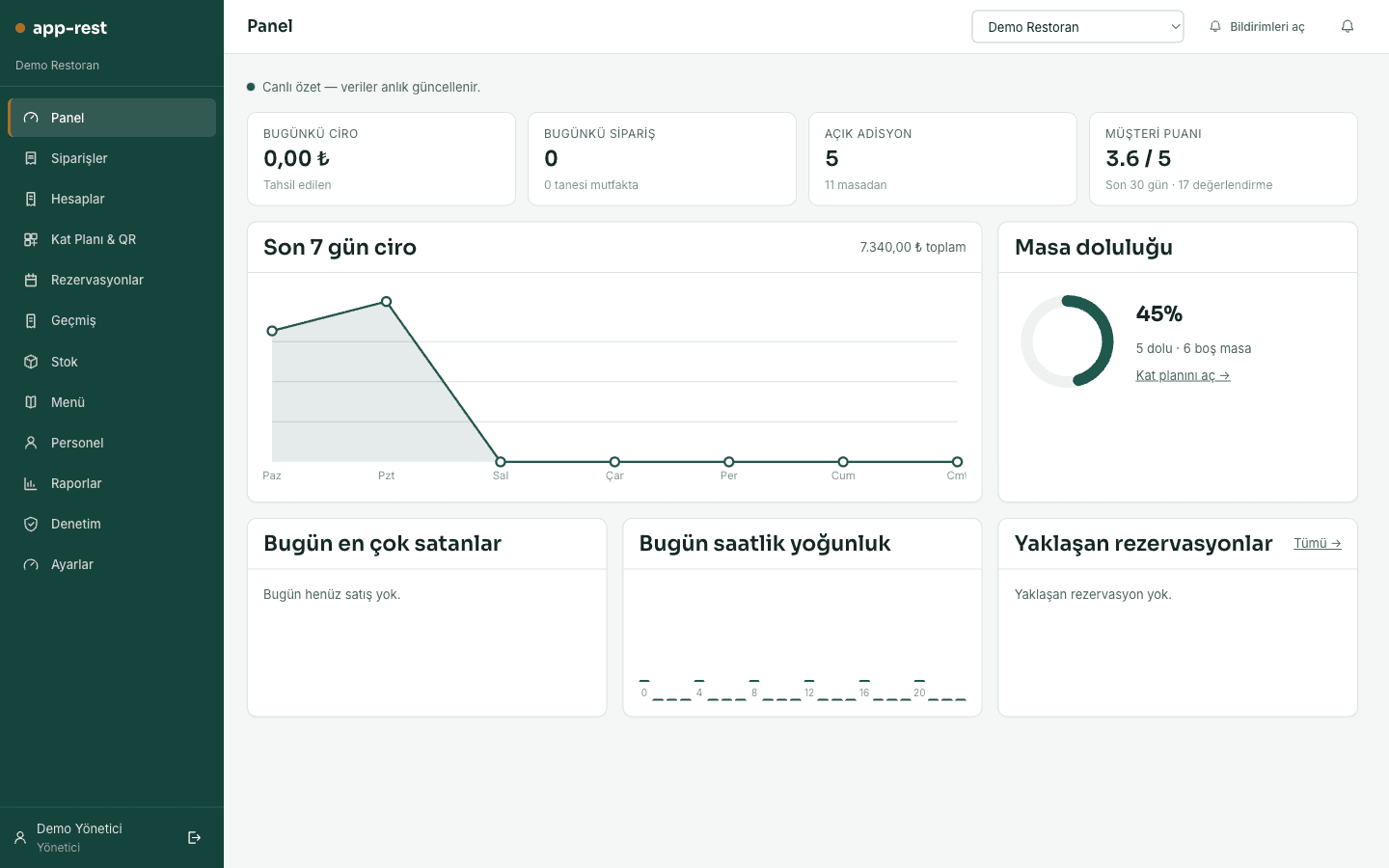
For management, guesswork is replaced by numbers. Cash-versus-card breakdown, closed checks and average check size, cancellation rate, estimated profit based on recipe cost, average prep time, guest rating, best sellers, revenue by section, staff performance and hourly traffic all read from the same screen, with a Z report and CSV export to hand accounting. The menu, brand color, logo and announcement banner belong to the restaurant itself, and every branch runs isolated with its own menu, tables and team under one account. Setup needs no server, no cabling and no proprietary hardware — the phones, tablets and browsers you already have are enough.
App-Rest
Application Surfaces
Guests
Guest QR Menu
Opens in the browser from the table QR — no login, no account. Guests browse the menu, pick variants and add notes, order, follow progress, call a waiter and view their check.
Owners, managers, cashiers
Management Panel
A full operations hub in the web browser: floor plan, orders, register, reservations, inventory, menu, staff, reports and audit log.
Waiters & kitchen team
Staff Mobile App
Orders arrive on staff phones instantly, a sound alert fires on every new ticket, and status advances with one tap. Staff working across branches switch with the branch selector.
App-Rest
Modules
The product ships with 27 modules, each managing one part of the operation end to end.
Dashboard
Today's revenue, open checks, table occupancy, pending orders and waiter calls in one live summary.
Orders & Kitchen Board
Incoming orders split into station tabs (Kitchen, Bar, Dessert); statuses advance and a sound alert fires on each new ticket.
Checks & Register
Open checks, bill splitting, comps, discounts, cash and card payments, receipt printing and closing.
Floor Plan & QR
Floors, sections and tables arranged in their real layout, with a printable QR code generated for every table.
Reservations
Incoming reservations managed on a calendar, with table assignment, capacity and conflict checks guaranteed by the system.
Check History
Every closed check is kept with line detail, discounts, comps and payment breakdown, searchable by date range and exportable.
Inventory & Ingredient Cards
Ingredient name, unit, current quantity, critical level and unit cost in one searchable list.
Recipe & Cost Editor
Define how much of each ingredient an item consumes; portion cost and gross margin are calculated automatically.
Goods Receipt & Stock Count
Incoming goods entered in one step with supplier and unit cost; count differences closed with a plus or minus adjustment.
Menu Management
Categories, items, images, prices, variants, allergen and calorie data managed bilingually.
Price Rules & Happy Hour
Define discount rules by time window and category; while active, the rule applies automatically on the menu and the check.
Staff & Invitations
Team members join with an invite code; roles and section responsibilities are assigned or revoked here.
Reports
Payment, check, item, section, staff, prep time, traffic and profitability reports, plus the Z report.
Audit Log
Cancellations, comps, discounts, table moves, check closings and payments tracked with who did what and when.
Settings & Branding
Restaurant details, logo, brand color, menu announcement banner, opening hours and review link are configured here.
Multi-Branch Management
Multiple branches live under one account; the branch selector switches menu, tables, stock, team and reports together.
Quote Builder
A super-admin tool where the platform operator builds quotes for new venues based on modules and branch count.
Staff Invite Acceptance
Invited staff create their own account and join the team with the code; no email delivery service required.
QR Menu & Cart
Bilingual menu, allergen badges, calories and labels, variant selection, item notes and cart — all without logging in.
Order Tracking & Waiter Call
Guests watch their order move through each stage live and call a waiter with one tap.
Table Check & Feedback
The table's running check is visible line by line, and a rating and comment screen appears once it closes.
Pickup Ordering Page
Takeaway orders placed with a name and phone number without a table; payment is collected on pickup.
Online Reservation Page
Guests pick date, time and party size, and the smallest suitable table with enough capacity is assigned automatically.
Restaurant Self-Signup
A new venue opens its own account, defines its restaurant and starts building the menu the same day.
Staff Sign-In
Team members sign in with their own account and only see the screens their role permits.
Branch Selector
Staff working at several branches switch their entire context with one tap in the app's branch selector.
Live Order & Kitchen Screen
New orders arrive with a sound alert; preparing, ready and served statuses advance with a single tap.
App-Rest
Screens
App-Rest
Key Features
Ordering & Service
The layer that carries an order from the guest's phone to the kitchen without errors, waiting or pricing mistakes.
Sign-up-free QR ordering
The guest scans the code and the menu opens in the browser. No download, no account, no forms — the table session starts on the first scan and everyone at that table adds to the same check.
Prices always computed server-side
The order total is calculated from the system's own records, never from data sent by the guest's device. No client-supplied price is trusted, closing the door on manipulation.
Structured variants & extras
Required single choices such as doneness and optional multi-selects such as extra toppings are defined separately. Each option's price difference applies automatically, and an order with a missing required choice cannot be sent.
Live kitchen board & stations
Orders split into Kitchen, Bar and Dessert tabs so each station sees only its own work. A sound alert fires on every new ticket and status advances with one tap.
Notifications even with the tab closed
Staff do not have to keep the panel open. New orders, waiter calls and reservations trigger a push notification on the device, so nothing slips through during the rush.
One-tap waiter call
Instead of waving, the guest calls a waiter from the menu and the call routes to the section's owner. Only one pending call is kept per table, so repeated taps never flood the queue.
Bilingual menu
Item name, description, category and ingredient list are entered separately in Turkish and English. In tourist-heavy areas there is no second menu to design, print or correct for translation errors.
Allergens, calories & labels
Fourteen allergen groups appear as icon badges on the item card, alongside calorie data and labels such as NEW, Vegetarian or Spicy. Accurate information reaches the guest without relying on a waiter's memory.
Goes well with recommendations
The three items most often bought together with the one just added are suggested. The recommendation comes from the restaurant's own real order history rather than a generic catalogue, lifting average check size naturally.
Floor Plan & Table Management
What you see on screen matches the real room; tables, sections, QR codes and reservations are managed in one place.
Drag-and-drop floor plan
Floors are separated into tabs and tables are dragged into their real positions. Even a new hire recognises a table on screen by where it sits in the room, cutting mixed-up checks.
Color-coded sections & waiter assignment
Sections such as garden, terrace or indoor hall get their own color, and each one is assigned a responsible waiter. Orders and calls route straight to that section's owner.
Per-table QR generation
Every table gets its own QR code that can be downloaded as an image and printed. Add a table and its code is ready immediately — no waiting on a designer or a print shop.
Table moves & merges
If guests change seats, the open check moves with them; for larger parties, tables merge into a single check. Every move is written to the audit log.
Conflict-free reservations
Two overlapping reservations for the same table, or a party larger than its capacity, are blocked by the system. Because the check happens in the data layer, even two simultaneous requests cannot create a double booking.
Automatic table assignment
Online reservations are automatically given the smallest available table that fits the party. A six-top is not burned on a party of four, so seating capacity is used efficiently.
Register & Checkout
Everything about the closing moment — splitting, settling, comping and collecting the guest's rating — stays under control.
Three ways to split a check
Checks split evenly, by defined ratios or line by line. If rounding leaves a fractional difference it is added to the final share, so the parts always add up exactly to the total.
Cash & card collection
Each share is collected as cash or card and recorded in the breakdown for reporting. The check closes only when every share is paid, so a half-settled table never shows as free.
Permission-gated comps & discounts
Line comps and check discounts apply as an amount or a percentage and only authorised roles can grant them. If any share is already paid the action is refused, and every comp and discount leaves a trace.
Printable check receipt
A printable breakdown is produced with subtotal, applied discount and grand total. The receipt handed to the guest always matches what the panel shows.
Time-based price rules
Define a percentage discount for a category within a set time window. While the rule is active, both the menu price and the price on the check change automatically, with no manual discounting by staff.
Guest rating at closing
When the check closes, the guest sees a one-to-five star and comment screen. Ratings of four or more are pointed to your Google review page, while lower scores reach the venue first.
Inventory & Cost
You know exactly which ingredients each plate consumes and how much profit it leaves behind.
Ingredient cards
Each ingredient carries its unit, current quantity, critical level and unit cost. Search finds it in seconds even in long lists, shortening pre-count preparation.
Recipe editor
Define which ingredients an item uses and in what amount. Items without a recipe do not touch stock, so you can start with only your critical items and roll it out gradually.
Automatic stock deduction
The moment an order is confirmed, its recipe ingredients come out of stock. If stock is short the order is rejected and the item is marked sold out on the menu, so you never sell what you cannot serve.
Automatic return on cancellation
Cancelling an order writes its deducted ingredients back into stock. No manual correction is needed, and the phantom shortfall that normally follows a cancellation disappears.
One-step goods receipt
Receiving goods creates the stock movement, records the supplier and updates the ingredient's unit cost in the same action. Cost calculations always reflect your latest purchase price.
Count adjustments & immutable ledger
Physical count differences are closed with a plus or minus adjustment. Past stock movements cannot be edited, so you can trace later on which day and in which action a loss occurred.
Critical stock alerts
Ingredients that fall below their critical level surface in a warning banner in the panel. Purchase lists are built from real consumption instead of guesswork.
Per-item profitability
Recipe cost multiplied by units sold yields each item's total cost and gross margin. Best sellers that barely earn become visible, and menu pricing is driven by data.
Reporting & Administration
Today, yesterday and your team are all measurable, while permissions, audit trails and brand control stay with the venue.
Payments & revenue report
For any date range you get total collections, cash and card breakdown, number of closed checks and average check size. Handing over the register leaves nothing open to debate.
Order, cancellation & profit metrics
Total orders and cancellations sit next to estimated profit derived from recipe cost. When the cancellation rate climbs, you see it before it shows up in the profit line.
Item & section performance
The eight best-selling items and revenue by section are listed separately. It becomes clear which section earns at which hour and which item is just taking up menu space.
Service quality measurement
Average prep time and average guest rating are tracked together. Put the days the kitchen slowed next to the days ratings dipped and the cause surfaces.
Staff performance & traffic
Sales and closed checks per staff member are reported alongside the hourly traffic curve. Shift planning follows the real curve instead of a hunch.
Z report & CSV export
Take the end-of-day Z report and download payments, item sales and past checks as spreadsheet files. Handing data to accounting stops being copy-paste work.
Role-based permissions
Each role sees only its own screens and actions. Privilege escalation is blocked in the data layer, so a staff member cannot change their own role or reach another branch.
Audit log
Cancellations, comps, discounts, table moves, check closings and payments are recorded with who did them and when. Instead of arguing about a shortfall, you read the record.
White-label brand control
The menu the guest sees carries the restaurant's logo, brand color and announcement banner. A campaign, holiday notice or new-item announcement goes live at the top of the menu instantly.
App-Rest
User Roles
Every role sees only its own work; permissions are enforced at the data layer.
Guest
Opens the menu via QR without logging in — orders, follows progress, calls a waiter, views the table check and leaves a rating at closing.
Waiter
Runs the tables in their section — takes orders and advances their status, answers waiter calls, moves tables and opens checks.
Cashier
Adds to the waiter's scope by splitting checks, taking cash and card payments, granting line comps and check discounts, printing receipts and closing checks.
Manager
Manages the menu, price rules, floor plan, inventory and recipes; invites staff and assigns roles; sees all reports, the audit log and settings.
Super Admin
Manages multiple restaurants at the platform level, oversees new venue signups and prepares quotes based on modules and branch count.
App-Rest
Frequently Asked Questions
How long does setup take, and do we need special hardware?
There is no server, cabling or proprietary device to buy — the system runs in the cloud and the phones, tablets and computers you already have are enough. Once the restaurant account is created, the menu, tables and QR codes can be ready the same day; the only real variable is how large your menu is. The floor plan and stock recipes can be filled in gradually over the first week, and neither has to be finished before you start using the system.
How do we bring our existing menu into the system?
Categories, items, prices, variants, allergens and calorie data are entered in the panel, and every field can be written separately in Turkish and English. We migrate your menu together during onboarding, so all you do is verify prices and content. From then on, price changes go live instantly from the panel — no reprinting menus and no chasing outdated cards on tables.
What happens if the internet goes down?
Because the system runs in the cloud, your data lives in a backed-up central store rather than on a machine in the venue, so nothing is lost during an outage. When connectivity returns, the panel and the staff app pick up exactly where they left off. Most venues keep a staff phone's mobile data as a fallback, which is enough to keep service running through short outages.
Can we use it alongside our existing POS or fiscal register?
Yes. App-Rest takes over ordering, floor, inventory and reporting, while your legal receipt and invoicing process can continue on your existing fiscal register. Closed checks export with line detail, discounts, comps and a cash-versus-card breakdown, so end-of-day reconciliation does not require manual counting. Many venues run both systems side by side during the transition and then move fully onto App-Rest.
How much training does the staff need?
For a waiter there are only a handful of screens to learn: open the table, see the order, advance the status, close the check. The staff app shows only the screens that role needs, so nobody gets lost in a crowded menu. Mistakes are not permanent either — cancellations, moves and corrections can be reversed and are visible in the audit log, which is why teams get comfortable from day one.
We have several branches — can we manage them all from one place?
Yes. You can define as many branches as you need under a single account, and each one runs isolated with its own menu, tables, stock and team. The branch selector switches the entire context at once, so there is no risk of entering an order or a stock movement against the wrong branch. Staff who work at more than one location switch with the same account, and managers can report on and compare branches separately.
How would App-Rest work in your business?
We'll set up a personal demo environment; try it with your own data and get your questions answered.
Request a DemoOur other product: Site-Park — Property & Community Management